Planning with Spec Kit
Write the spec, plan and tasks with Spec Kit's own skills run by speccoder, honour Spec Kit extension hooks, and run speccoder as a step of a Spec Kit workflow.
speccoder runs Spec Kit’s own planning skills, honours its extension hooks and plugs into its workflow engine. For OpenSpec, see OpenSpec planning.
Spec Kit’s planning skills
specify init --here --integration claude installs Spec Kit’s commands as Agent Skills (.claude/skills/speckit-*/SKILL.md); speccoder finds skills under .claude/skills/ and .agents/skills/ and runs them with its own model:
speccoder spec                                         # the installed skills
speccoder spec specify "A function greet(name) that …" # spec.md
speccoder spec clarify                                 # asks you about what is unclear
speccoder spec plan                                    # plan.md, research.md, data-model.md, quickstart.md
speccoder spec tasks                                   # tasks.md
speccoder spec analyze                                 # a read-only consistency report
A planning skill works in your checkout, since the spec belongs on your branch. Without asking, it may write specs/…, .specify/feature.json and .specify/memory/… and run Spec Kit’s scripts (.specify/scripts/, and those of installed extensions). Writing source code needs your approval; Spec Kit’s templates and scripts, speccoder.toml, secrets and review.json are denied.
Results are left uncommitted, and speccoder offers the commit. A clarifying question is asked at the terminal; with --no-prompt it stays in the spec as [NEEDS CLARIFICATION].
Plan through
speccoder spec specify "Users can export a report as CSV" --through tasks--through spec|plan|tasks|analyze runs the format’s own skills in its order — Spec Kit: specify, plan, tasks, then analyze; OpenSpec: propose — each unchanged, as speccoder spec runs it. It stops only where you decide:
| Stop | When | Goes on with |
|---|---|---|
THROUGH-QUESTIONS | The spec leaves open questions | speccoder review answer Q1 "…", then the review |
THROUGH-REVIEW | After the spec, before anything is planned | Your approval of the requirements (speccoder review approve); at a terminal it asks Approve FR-001 … FR-004 and plan? [y/N] |
| failed | A skill failed or was refused | The same command again: it runs from that skill |
| done | The chosen step is written | The commit of the planning files; the plan checks of the new task list are shown |
Questions a skill asks while it writes are answered in place. No flag passes the review stop — --yes never does — and nothing is committed. Plan through keeps no state of its own: where it stopped is read from the unit’s files and the review record, so speccoder spec plan --through tasks continues after a stop, and every Next: line says so. --through is taken only by the format’s chain (its creating, planning and checking skills).
Before the creating skill runs, the description is compared with every feature’s requirements by a deterministic text similarity (no model). A close match prints warning[SIMILAR-FEATURE] and the skill still runs; extending that feature instead is a comment on its spec, sent as one revision. speccoder feature similar "…" shows the matches alone.
Plan checks
speccoder doctor --feature <F> and the web’s Before you run read the task list for where it will produce no evidence. Each is a warning with its tasks and its fix; none blocks, delays or re-orders a run, and a run says once that they exist (plan: 3 warnings — speccoder doctor --feature …).
| Code | Finds |
|---|---|
PLAN-TESTS-UNCOLLECTED | Test paths a task names that the runner won’t collect (and no task creates the file that would declare them); test files in the tree nothing runs |
PLAN-BEHAVIOUR-EARLY | A Setup or Foundational task that names, in code, a symbol a story is about: if it implements it, the story’s tasks tick regression-only |
PLAN-TEST-ONLY-TASKS | Story tasks that only write tests, beside the task that implements the story |
For PLAN-BEHAVIOUR-EARLY, speccoder task acceptance-at <TASK> --story <US> records that the story’s acceptance tests are written at that task: its tick can then be verified on the story’s scenarios. It is a decision in the state directory, not an edit of the spec, and --revoke takes it back. Re-planning is offered only while no task of the feature is ticked.
The phase-based checks need Spec Kit’s phases and story labels; OpenSpec gets only the first. Beside them, information rather than a warning, a line says which tasks are planning work or yours (who does a task).
The speccoder preset
speccoder preset add installs speccoder’s Spec Kit preset with Spec Kit’s own specify preset add --dev <dir> --priority 10 (Spec Kit 1.2.0 or newer), after showing the command and asking; --yes skips the question. The preset is bundled in speccoder — nothing is downloaded — and replaces only the tasks template: a story’s behaviour stays inside its story, no task only writes tests, and test paths are ones the runner collects. It also says who does each task: design documents belong to the plan, and a step only a person can take is labelled [YOU] (who does a task). Later task lists follow it; nothing in specs/ changes. speccoder doctor says whether it is active, and offers an update when this speccoder bundles a newer one. Spec Kit’s scripts read a preset’s manifest with a Python that imports PyYAML: speccoder runs them with the installed specify’s own interpreter (SPECKIT_PYTHON_EXECUTABLE, unless you set it), and doctor and preset add warn when no such Python is found (troubleshooting).
Not hosted: speckit-implement and speckit-converge (use speccoder run and speccoder converge, which record evidence) and speckit-taskstoissues (speccoder issue start N goes the other way, see GitHub).
Review the spec
The result is judged against the spec, so you sign off its requirements one at a time:
speccoder review                       # every requirement and its review
speccoder review approve FR-001 FR-002 # on their current wording
speccoder review request FR-003 -c "say what happens to open sessions"
speccoder review approve               # every one still unapproved
speccoder review answer Q1 "sessions end at once"
speccoder review edit FR-003 "Users MUST log out of every device." --approve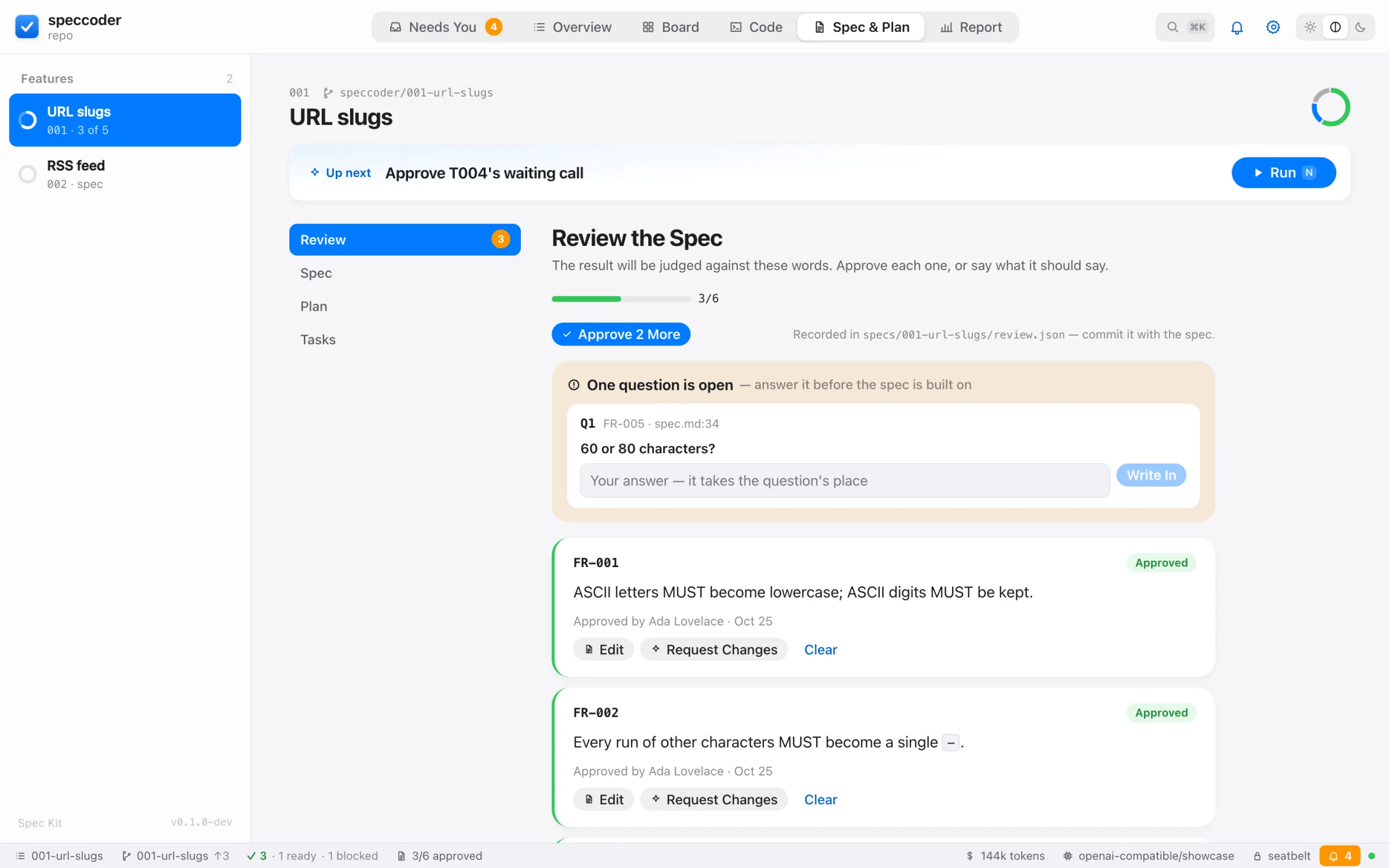
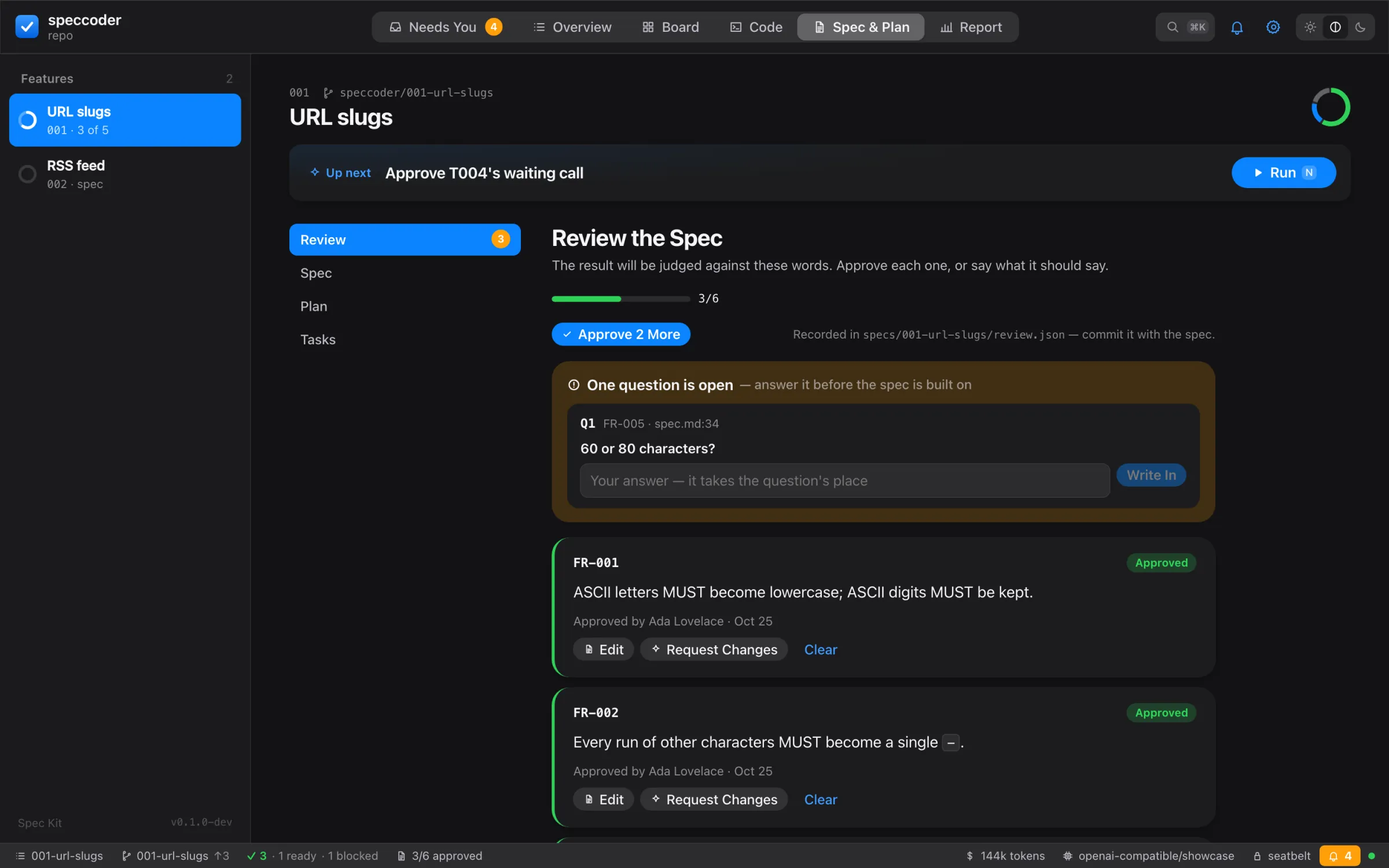
- Open questions. Every
[NEEDS CLARIFICATION: …]in the feature’s documents is a question (Q1,Q2, …).answerputs your words where it stood and touches nothing else. - Edits.
editkeeps the identifier; the approval lapses unless--approve. A wording that still contains a question cannot be approved;approvewithout IDs skips it and says so. - Lapses. A decision is bound to the exact line and names who made it (git’s
user.name). Reword the line and it lapses: it shows again, old wording beside new. - Change requests go to the revising skill (Spec Kit:
clarify) in one request (speccoder spec clarify "…", or Revise the Spec in the app). - History.
speccoder reviewalso shows what changed since the spec’s last commit, and its earlier versions.review clearremoves a decision.
The review is kept in review.json beside the spec; commit it with the spec so the team, the pull request and every later run see the same sign-off. Only speccoder review writes it: a change by a planning skill is undone and reported. With [review] required = true, a run waits (REVIEW-PENDING) until every requirement is approved in the committed review.
Review the tests
Before any code exists you can read and shape the oracle: the acceptance tests a run will use for a requirement with scenarios (Spec Kit: a user story, US1). Approving freezes them.
speccoder review tests US1 --write                       # write them
speccoder review tests US1 --reject tests/a.rs --reason "asserts the wrong rounding"
speccoder review tests US1 --again tests/a.rs --comment "check an empty name too"
speccoder review tests US1 --edit tests/a.rs --from my_test.rs   # your content, red-checked
speccoder review tests US1 --reading A US1-2             # which reading of a scenario is meant
--write calls the test author [review] oracle_samples times (1 or 2, default 2), independently, and compares what each says it asserts per scenario. The first author’s tests are red-checked on HEAD in a scratch worktree, in the OS sandbox (without it: SANDBOX-UNAVAILABLE): each test alone, by its own command, first without its file, then twice with it. With [acceptance] held_out on, a held-out set is written and sealed; you see its count and digest only.
- Every test must cite a scenario of its requirement; one that cites none is discarded and listed.
- Only a test that is red now, on an assertion or an absent symbol, can be frozen; one that already passes is shown as no evidence. A test whose command another test shares, or whose command is red without the file, is discarded and listed.
- With two samples, expectations that cannot be read or that name an unknown scenario fail the call (
ORACLE-AUTHOR-FAILED). - Rejection reasons, comments and chosen readings are told to every later author call for that requirement.
- Ambiguous. When the two authors state the same given with different outcomes (or one finds it untestable), the requirement is read two ways: Approve and Run and a gated run wait (
REVIEW-AMBIGUOUS) until you choose a reading (B rewrites that scenario’s tests) or reword it. - A quick change or a bug writes no tests here (
REVIEW-TESTS-OWN-PIPELINE); on a bug unit the Tests tab lists its confirmed reproductions, read only.
Approve and Run
speccoder review approve --run ask                        # risky calls ask inline
speccoder review approve --run autopilot --list-grants    # the grants offered; approves nothing
speccoder review approve --run autopilot --grant ID       # nobody is asked
--run approves every open or lapsed decision line, freezes each requirement’s red tests (review.json records oracle and approval, digests only), commits review.json and starts the run. It is refused while a question is open (REVIEW-PENDING), a requirement is read two ways, a run is active, or the feature has no task yet (NO-TASKS: nothing is approved — review approve without --run approves the spec alone, spec tasks writes the tasks). autopilot needs the OS sandbox and holds only the grants you name (autopilot).
- In the app it binds to what its sheet showed: a test changed in between is refused (
REVIEW-CHANGED) and the sheet shown again. - Frozen tests are read only (
ORACLE-FROZEN) until a reworded requirement lapses the freeze; the run then writes tests anew. A checkout without the stored set (a teammate’s) says frozen oracle not present here and does the same. - The first task citing a frozen requirement’s scenarios writes those tests, checks them red with the sealed held-out set, and makes no author call; its tick carries the
Acceptance: review …trailer (evidence). - A stored test or record that no longer matches its digests stops the task (
ORACLE-TAMPERED); so does an unreadablereview.json(REVIEW-UNREADABLE).
Comments
Comment on a passage of a spec document, a line of a shown test or a review finding (--finding SRC:ID). Comments wait in a tray (in the state directory) and go out together as one revision by the revising skill (Spec Kit: clarify), limited to the sections they touch:
speccoder review comments add --path specs/001-x/spec.md --lines 40-42 "say who may log in"
speccoder review comments add --test US1:tests/a.rs:3 "check the error text too"
speccoder review comments send      # one revision; changes outside your comments' sections are flagged
speccoder review comments keep t1   # keep the revision (or an outdated comment, by its id)
speccoder review comments undo # the documents back, byte for byte- A comment whose words moved is outdated, sent only if you keep it.
- A test-line comment asks the author again for that test after the revision, unless the revision lapsed its tests.
- A batch is sent once; a second send of the same comments is refused.
- A section is its document and its heading; the tray shows each changed section word by word until you keep or undo.
- A document someone else changed while the revision ran is named changed beside the revision. Undo writes only the unit’s own documents and refuses one changed since.
- A tray that cannot be read is refused (
REVIEW-UNREADABLE), never read as empty.
The current feature
Every command works on the current feature, kept where Spec Kit keeps it, in .specify/feature.json (per checkout, ignored by git), so speccoder, Spec Kit’s scripts and the /speckit-* commands in your editor agree.
speccoder feature              # every feature with its progress and stage
speccoder feature 2 # or: speccoder feature farewell, speccoder feature 002-farewell- Order:
--feature NAME, thenSPECIFY_FEATURE_DIRECTORY, then.specify/feature.json, then the only feature. The first two choose for one command without changing the current one. speccoder spec specifymakes the feature it creates current. Other planning skills are told the feature (SPECIFY_FEATURE_DIRECTORY).- With several features and none current,
runandspecask at a terminal and remember the answer; elsewhere they stop with the list.speccoder doctorreports a pointer to a missing feature. reportanddoctorsay which feature and why. In the dashboard,fopens a picker.speccoder feature --clearforgets the current feature.- A feature with a spec but no
tasks.mdis being planned:reportand the dashboard show the planning skills that come next.
The next step, taken
At a terminal, after a planning step, a task decision or the report, speccoder offers the next step and the command it stands for:
  ✓ spec ── ✓ plan ── ✓ tasks ── ● commit ── · run ── · review
  Commit the planning files (1)
  + specs/001-greet-function/tasks.md
  $ git add specs/001-greet-function/tasks.md && git commit …
  Commit them? [Y/n]
A commit takes exactly the feature’s planning files, as spec(<feature>): <files>, and nothing else you have staged. Answer n to do it yourself. Nothing is asked with --json, --events, spec … --no-prompt or without a terminal.
Extension hooks
Spec Kit extensions register hooks in .specify/extensions.yml (the git extension, for example, creates a feature branch before specify). speccoder runs them around what it runs:
| Event | Around |
|---|---|
before_<skill> / after_<skill> | a hosted planning skill, with its arguments |
before_implement / after_implement | speccoder run |
before_converge / after_converge | convergence |
A mandatory hook (optional: false) runs as a hosted skill under the planning policy; if its skill is missing or does not complete, the run stops before any task. An optional hook is offered with its prompt and command. Hooks with a condition are left to Spec Kit’s executor; disabled ones are ignored.
Spec Kit workflows
speccoder workflow install adds a speccoder step type (.specify/workflows/steps/speccoder/) and an example workflow (.specify/workflows/speccoder/workflow.yml: specify, plan and tasks, each followed by a review gate, then a commit and run --converge); --force replaces existing files.
speccoder workflow install
specify workflow run .specify/workflows/speccoder/workflow.yml \
  --input spec="A Rust function clamp(x, lo, hi) that …"
# paused? decide (speccoder inbox, speccoder task approve|accept|nudge), then:
specify workflow resume <run-id>
A step with skill: (and args:) runs a planning skill; with bug: (a slug of Spec Kit’s bug extension) it runs speccoder bug run --slug; otherwise speccoder run --no-prompt. Other options: converge, feature, max_tasks, timeout (seconds), executable. When speccoder needs a person (exit 23), the step pauses instead of failing, and resume runs it again. The step type needs Spec Kit 1.1 or later; with older releases, a plain shell step running speccoder --json run --no-prompt works but fails rather than pauses. For the bugfix overlay, see bug fixes.
Writing specs that verify well
- Give each user story concrete Given / When / Then examples with real values.
- Keep examples deterministic: no clocks, network or randomness in expected results.
- Name the files a task changes (
… in src/lib.rs) and keep tasks small enough for one attempt. - Mark tasks that can run in parallel
[P], and have them touch different files.
Shape: help with the words
Under the fields whose words become the judge or an instruction — a new feature’s description, a quick change, a bug’s lines, a requirement’s rewording, a hint, an answer — the writing check shows as you type what cannot be tested: vague words (“fast”, “etc.”), a requirement without MUST or SHALL, a When without a Then, no failure path. No model.
✦ Shape opens a sheet over the field. The model proposes the words in your spec’s format and language; code, not the model, shows what changed:
- your words on the left, the proposal on the right; words the assistant added tinted, words of yours it dropped struck through;
- every value it introduced (a number, a limit, a format) is an assumption: Keep, Ask instead (it becomes an open question the spec review asks) or Remove; an added number or quoted term it did not declare is flagged Added without saying why;
- a sentence of yours that landed nowhere is Not carried over: Add it back or Drop it;
- written in another language, the proposal comes in the spec’s language with a translation back into yours.
Use It fills the field once each of these is decided; nothing is saved until the field’s own sheet saves. A reason you give — rejecting, skipping, accepting — is never offered for shaping: it stays your words. In the terminal:
speccoder shape "export stuff fast, csv probably"          # proposal, what it added and dropped
speccoder shape --check --field requirement "…"            # the writing check alone, no model
speccoder review edit FR-003 "…" --shape --accept          # applied only if nothing is unexplained or dropped